How to Write a Bug Report Developers Act On (With 3 Templates)
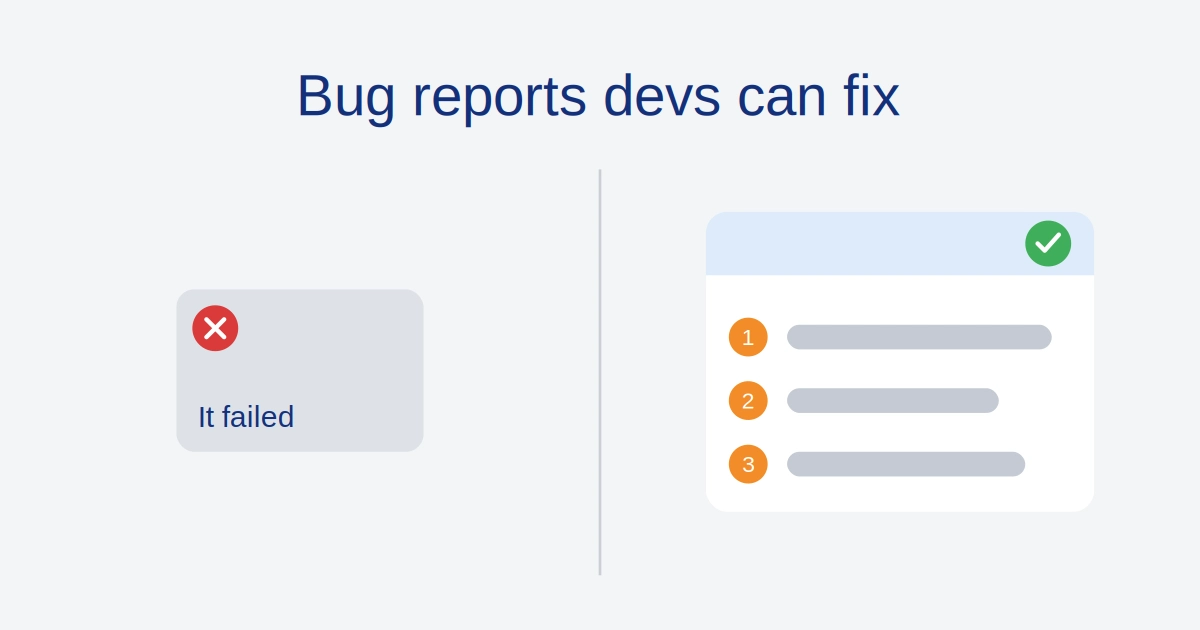
You spend twenty minutes writing up a defect, and by lunch the status says Cannot Reproduce. The comment underneath reads “works on my machine.”
Knowing how to write a bug report that survives triage has little to do with writing talent. It comes down to handing a stranger every fact they need to see the same failure on their own screen, without sending you a single follow-up question.
Below you’ll find the pre-flight checks, the eight parts of a ticket developers act on, a good versus bad example, extra rules for intermittent, API and AI bugs, and three templates you can paste into Jira, GitHub or Slack.
Quick answer: what a bug report developers act on needs
Here’s how to write a bug report: give a developer a known starting state, numbered steps to reproduce, the expected and actual results in literal terms, and proof such as an error message, screenshot or recording. Add the build where it broke and the last build where it worked. That one line often saves the longest part of the hunt.
Four things carry most of the weight:
- Starting state: name the environment, build, user role and account state the bug needs, because that is exactly what “works on my machine” hides.
- Steps: number them, one action per line, using the exact button labels and test inputs.
- Results: write what should happen and what literally happened, never just “it failed.”
- Proof: paste error text as text, and add a screenshot or short recording where it helps.
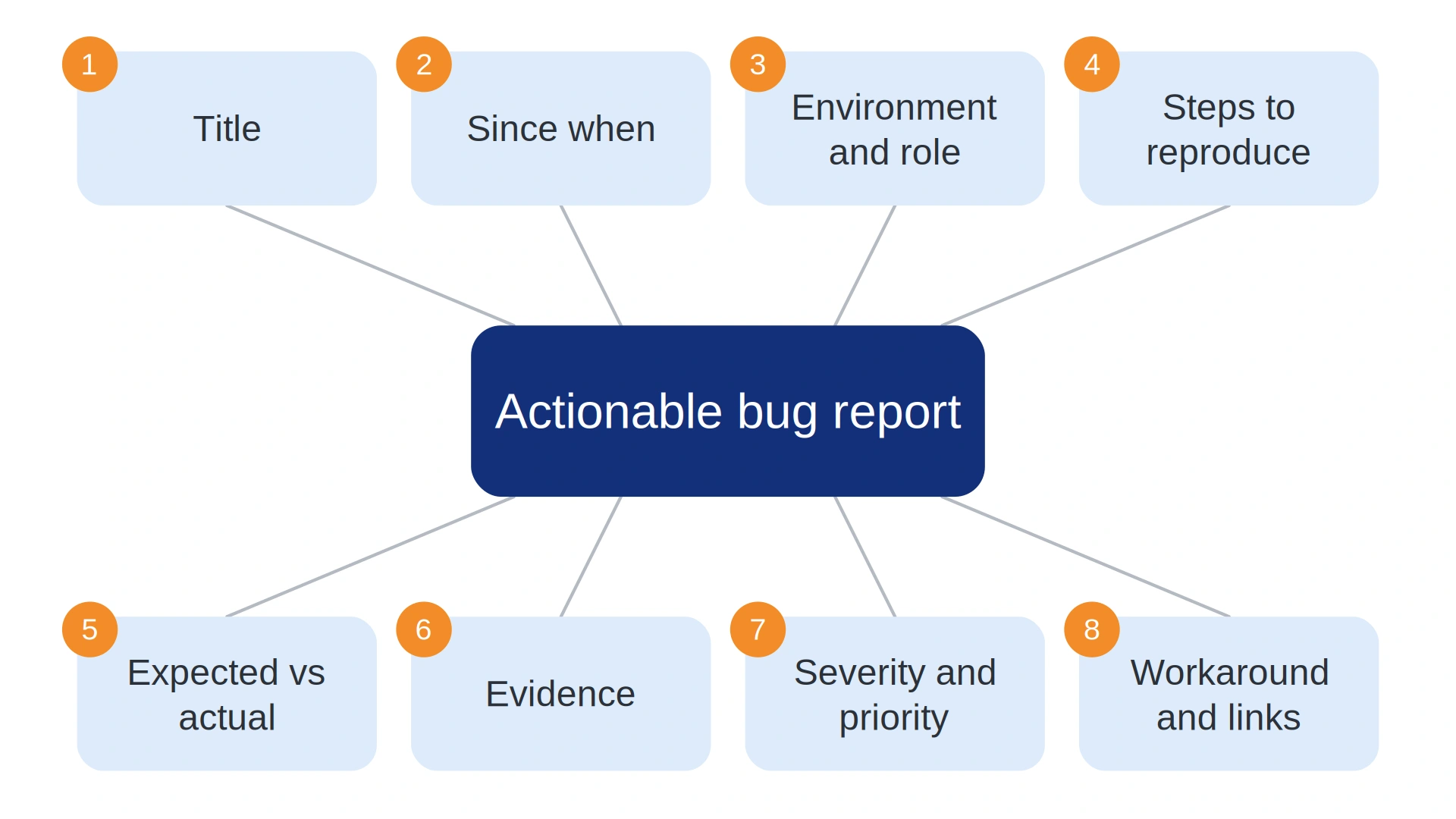
Table of Contents
Why developers close bug reports as “Cannot Reproduce”
Developers don’t close tickets out of spite. They work through a triage queue, and a report that can’t be reproduced in a few minutes loses to the next ticket, which might be easier.
Researchers studied 576 Firefox and Eclipse reports that were marked non-reproducible and found 11 factors behind the label. In their developer study, people either closed those bugs or chased missing details through long threads. You can read the details in a large empirical study of non-reproducible bugs.
Debugging time is expensive, too. Stripe’s 2018 Developer Coefficient report put the average developer week at 41.1 hours, with 17.3 of them going to technical debt and bad code, roughly 42% of the week.
One caution if you quote it. That report is about code quality, not tickets, and its numbers are survey estimates. Its $85 billion figure also covers only the roughly four weekly hours spent on bad code, not all 17.3.
Here’s a number from our own work. A retrospective audit of a legacy web app project found that 29 of 42 tickets closed as Cannot Reproduce in a single quarter, nearly 70%, were missing either the user role or the staging build number.
Developers spent an average of 45 minutes per ticket trying to recreate the state before they changed the status.
So I’d treat a bug report as a sales document written for one engineer, and as a small contract between QA and development. You’re selling the idea that this defect is real, specific and worth their next hour. A report with no steps to reproduce isn’t a report. It’s an unscheduled request for an investigation.
The rule behind how to write a bug report well is the Stranger Test. Write the ticket so someone who wasn’t in the room can reproduce the issue from scratch without asking you anything.
The most common mistake is a report that starts halfway through the workflow, like “Click Pay and nothing happens.” Pay on what cart, signed in as which user, on which build? Skip that context and you’ve written a riddle.
Four checks before you open Jira or GitHub
A few minutes of pre-flight work prevents most rejected tickets. If you’re newer to the field, bug reporting is one of the first skills I’d put in any software testing roadmap, and mine lays out the stages from manual testing to AI.
Reproduce the bug two or three times
Run the steps again from a clean starting state. If it fails every time, you have a reproducible bug. If it fails once, you may have caught a network blip or a timing issue, and that changes how you report it (see the section on intermittent bugs below).
While you repeat it, cut every click that doesn’t matter. The shortest path to the failure is the one a developer can run in a minute.
Rule out your local setup
Open a private window with extensions turned off and try again. Then try a second browser, such as Firefox or Safari if the first was Chrome. Extensions and cached data cause bugs that exist on exactly one laptop.
If it fails only in your regular profile, say so in the ticket. That’s a useful fact, not a reason to skip the report.
Search the backlog for duplicates
Search the tracker for the error text and the feature name. If a ticket already exists, add your findings as a comment instead of filing a second one, because duplicates clog triage.
Linking related reports helps too. The same study mentioned above found that links to existing bug reports might improve the reproducibility of a new one.
One bug, one report
File one defect per ticket. A report that bundles a layout glitch, a slow search and a broken coupon can’t be assigned to one person or retested in one pass.
If you’re unsure whether two symptoms share a cause, file two tickets and link them. A developer can merge tickets later far more easily than they can untangle one.
How to write a bug report step by step: the 8 essential elements
A good bug report has eight parts. Each one answers a question a developer would otherwise ask you in a comment, and every question adds another round trip before the fix.
1. A scannable bug title (use a three-part formula)
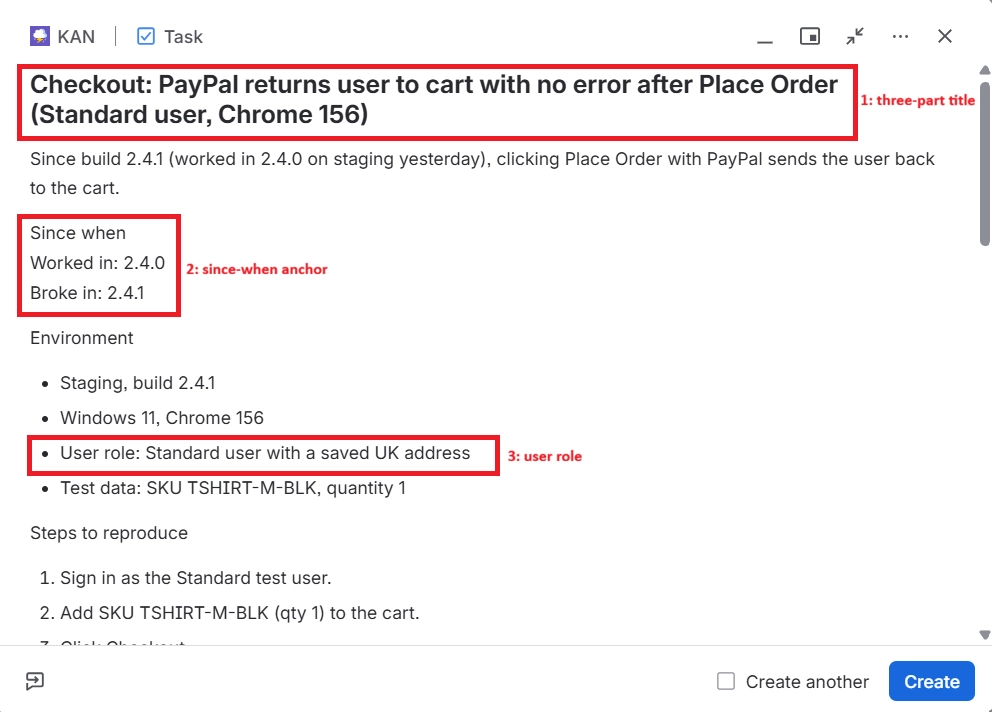
A title should say which feature, what breaks and under what condition: [Feature or page] + [what breaks] + [trigger or condition]. “Checkout broken” becomes “Checkout: Apply Coupon button unresponsive after entering a promo code in Chrome 156.”
People read titles in board columns, notifications and search results long before they open a ticket. A precise title also makes duplicates easy to spot for the next tester who searches the backlog.
2. A short description and the “since when” anchor
Two sentences are enough: what’s wrong and who it hurts. Then add the highest-value line in the whole report, the since-when anchor. For example: “Worked in v2.4.0 on staging yesterday, broke after the v2.4.1 deploy.”
That line narrows the search to the code changed between two builds, which developers can compare in release notes or commit history. If you don’t know, write “Unknown, first noticed on [date].” An honest unknown beats a guess that sends someone to the wrong diff.
3. Environment and preconditions (the cure for “works on my machine”)
List the build, OS, browser and version, device and exact URL. Then add the field most reports forget: user role and account state.
Developers often test locally as an admin with a clean database. Real bugs frequently hit a Guest or Standard user with a half-complete profile, an expired plan or a saved address in another country. If the role isn’t in the ticket, “works on my machine” is almost guaranteed.
Here are the fields I’d make required:
| Field | What to write | Why developers need it |
|---|---|---|
| Build or version | Exact build number or release tag | Matches the report to the right code |
| Environment | Production, staging or local, plus the full URL | Each environment has different data and configuration |
| OS and browser | For example Windows 11 and Chrome 156, with version numbers | Rendering and API behavior differ between versions |
| Device | Model and screen size for mobile or responsive bugs | Layout and touch bugs depend on the device |
| User role and account state | Guest, Standard or Admin; plan, permissions, saved data | The most common hidden cause of “works on my machine” |
| Test data | The SKU, order ID or inputs you used | Lets them repeat the exact scenario |
Our team once shipped an update where the checkout button disappeared, but only for Guest users with exactly one item in the cart and a shipping address outside the primary country. Our internal testing always used pre-registered accounts with saved addresses, so nobody saw it.
We found it in a session recording tool, where the layout visibly broke for anonymous first-time visitors.
4. Foolproof steps to reproduce a bug
Steps to reproduce a bug are the part developers read first and trust last, so make them boring and exact. These rules cover most cases:
- Number every step and keep one action per line, so a developer can tell exactly which step failed.
- Use the label on screen. Write “Click Save Draft,” not “save it.”
- Include the exact inputs: the SKU, the promo code, the file name, the amount.
- Begin from a known starting state, such as logged out with an empty cart, never halfway through a flow.
- End with a reproducibility rate, such as “Reproduced 5 of 5 attempts.”
Why the rate? A bug that fails every time and a bug that fails one time in ten need different investigations, and the number tells the developer which one they’re facing before they start.
5. Expected vs actual results (and why “it failed” hides everything)
Write what should happen and what literally happened, as two separate lines. “It failed” could mean an error message, a silent no-op where clicking does nothing, an endless spinner, a partial save, a wrong calculation or a crash. Each one points a developer at a different part of the code.
Report observations, not guesses. “The Save button shows no message and the draft is missing after refresh” is a fact. “The database is broken” is a theory, and a wrong theory costs more time than none.
6. Visual proof and DevTools logs
Use an annotated screenshot for layout and visual bugs. Use a short screen recording, around fifteen seconds, for flows and timing problems where the sequence matters.
Everyone says always attach a recording. I’d take numbered steps with no video over a video with no steps. A recording proves the bug exists, but only written steps let a developer run it on their own machine.
Paste exact error messages as plain text, not only inside a screenshot. That way a developer can search the codebase for the string with Ctrl+F or their editor.
For technical evidence, open Chrome DevTools: Cmd+Option+I on Mac, or F12 or Ctrl+Shift+I on Windows and Linux. Cmd+Option+J or Ctrl+Shift+J opens the Console directly, as listed in Chrome’s DevTools keyboard shortcuts. Open DevTools before you reproduce the bug, because the Network panel only records while it’s open.
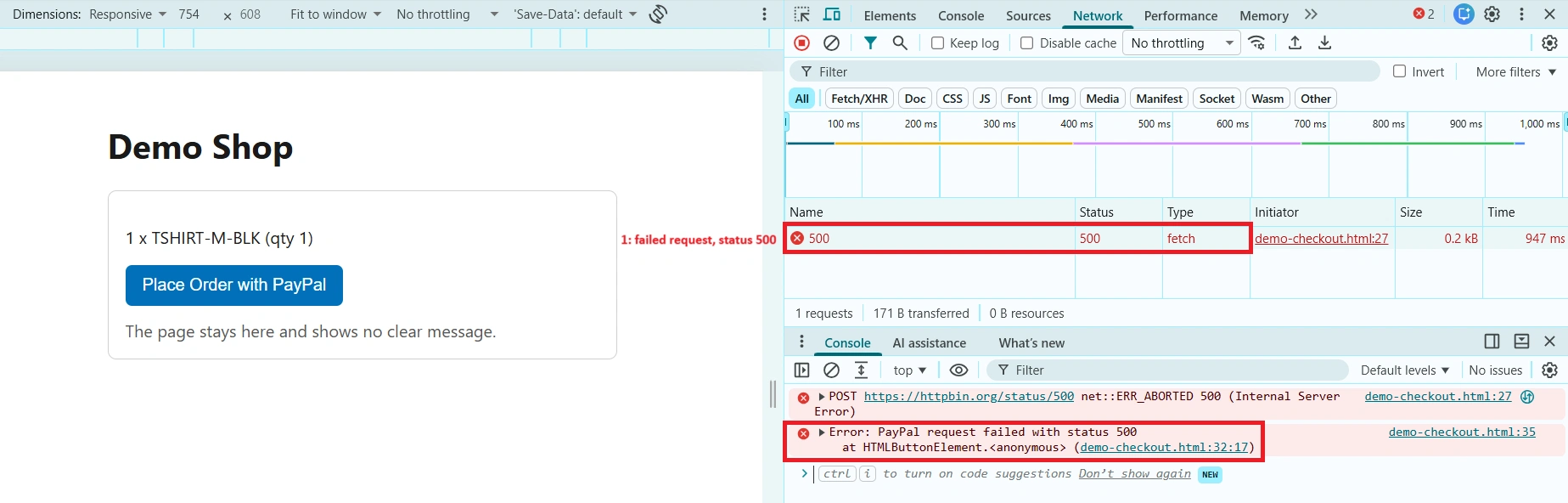
In the Console, copy the red error line and its stack trace as text. In the Network panel, find the failed request, usually shown in red, and note its method, URL and status code. If the page navigates during your steps, turn on Preserve log so earlier requests don’t vanish.
A HAR file (a saved log of network traffic) can help with hard cases, but handle it carefully. Recent Chromium-based browsers export a sanitized HAR by default, with cookies and authorization headers removed, yet the file can still hold personal data.
Treat a HAR like a credential. Your company’s GDPR or UK GDPR obligations still apply to ticket attachments, so use a test account rather than a real customer’s.
7. Bug severity vs priority (a matrix you can reuse)
Severity is the technical impact of the bug on the system and its users: Critical, High, Medium or Low. Priority is the business urgency of fixing it: P1 to P4. They’re related, but they aren’t the same number.
In my view, testers should propose a severity and leave priority to whoever owns the schedule. You know how badly it breaks. You usually don’t know what ships on Friday.
| Case | Severity | Priority | Example | Typical action |
|---|---|---|---|---|
| High severity, low priority | High | P3 | Crash when exporting a report in a legacy format only two customers still use | Schedule it, no hotfix |
| Low severity, high priority | Low | P1 | Company name misspelled in the logo on launch day | Fix today |
| High severity, high priority | Critical | P1 | Standard users can’t complete checkout | Stop and fix now |
| Low severity, low priority | Low | P4 | A 1px misalignment on an admin settings page | Backlog |
Jira’s built-in field is Priority, so teams that want a separate severity usually add a custom field. Check how your own project is configured before you assume.
8. Workarounds and linked tickets
Write down any workaround you found, such as “Refreshing the page lets the coupon apply.” A workaround lowers the urgency for users and gives support something to say today.
Then link related stories, epics and earlier tickets, so the developer sees the history without searching for it.
Good bug report vs bad bug report: a side-by-side example
Here’s one checkout bug written twice. The shop, build numbers, SKU and error text are invented for illustration.
| Field | Bad bug report | Good bug report |
|---|---|---|
| Title | PayPal checkout is broken | Checkout: PayPal returns user to cart with no error after Place Order (Standard user, Chrome 156) |
| Description | Can’t pay with PayPal. Please fix ASAP. | Since build 2.4.1 (worked in 2.4.0 on staging yesterday), clicking Place Order with PayPal sends the user back to the cart. |
| Environment | None given | Staging, build 2.4.1, Windows 11, Chrome 156, signed in as a Standard user with a saved UK address |
| Steps | Try to pay | 1. Sign in as the Standard test user. 2. Add SKU TSHIRT-M-BLK (qty 1) to the cart. 3. Click Checkout. 4. Select PayPal. 5. Click Place Order. |
| Expected vs actual | It failed | Expected: redirect to the PayPal sandbox login. Actual: the page reloads to the cart, no message shows, and the item is still in the cart. |
| Evidence | None | Console: Uncaught TypeError: Cannot read properties of undefined (reading ‘approvalUrl’). Network: POST /api/v2/payments/paypal returned 500. 12-second recording attached. Reproduced 5 of 5 attempts. |
The left column starts a comment thread. The right column starts a fix. A developer can run those five steps, search the codebase for the exact error string and open the PayPal request that returned 500.
How to report intermittent, API and AI bugs
Most guides stop at UI bugs with clean steps. Three modern cases need extra data, and they’re where a good report stands out.
Intermittent (flaky) bugs
A bug that fails two times out of ten can’t be solved by steps alone, because the developer can run them ten times and see nothing. Give them a way to look at the past instead. Record the exact UTC timestamp of each failure, down to the second, plus your user or session ID and the build.
With those, a developer can search production or staging logs for that moment instead of guessing. Say how often it happened, such as “2 of 10 attempts,” and what you changed between attempts.
The same applies when an automated run catches it. If a check in your release-day regression run fails once, attach the CI run link, the test report and the commit it built. A failure seen once is still evidence, as long as you say how often it repeated.
If you’re still deciding which checks deserve automation, I laid out four waves in what to automate first in regression testing.
Backend and API bugs
With no UI, the request is your steps to reproduce. Include the HTTP method and endpoint, the headers (secrets redacted), the request body, the expected and actual status codes, the response body and the matching server log line.
The example below is invented. Paste something like it, with your real endpoint, into the ticket.
curl -i -X POST "https://staging.example.com/api/v2/orders" \
  -H "Authorization: Bearer <REDACTED>" \
  -H "Content-Type: application/json" \
  -d '{"sku":"TSHIRT-M-BLK","quantity":1,"shippingCountry":"GB"}'
Expected: HTTP/1.1 201 Created. Actual: HTTP/1.1 422 Unprocessable Entity with a body saying shippingCountry is invalid, even though GB is a valid country code.
If your API returns a request ID header, include it. It’s the fastest route from your ticket to the right server log line.
Reporting bugs in AI and LLM features
Output from a language model can change from one run to the next, so a single screenshot isn’t enough. Log the exact prompt, the model name and version, the system instructions or settings, the full output, the timestamp and how often the problem repeated.
I’d also keep AI-generated root-cause theories out of the ticket, or label them clearly as a hypothesis. A chatbot can’t see your codebase, and a confident wrong theory can send a developer down a long detour before anyone notices.
Three software bug report templates to copy and paste
Knowing how to write a bug report is easier with a template to fill in. Copy these, then delete the fields your team doesn’t need. A shorter template that people actually fill in beats a perfect one they skip.
Template 1: standard Jira or Linear bug report template
Title: [Feature or page]: [what breaks] when [trigger] ([role], [browser or build])

Summary
One or two sentences on the problem and who it affects.

Since when
Worked in: [build, version or date]
Broke in: [build, version or date]
(If unknown: Unknown, first noticed on [date])

Environment
- App build:
- Environment and URL:
- OS and version:
- Browser or device and version:
- User role and account state:
- Test data (SKU, IDs, inputs):

Preconditions
[Starting state, for example: logged out, empty cart, feature flag X on]

Steps to reproduce
1.
2.
3.

Expected result:
Actual result:

Reproducibility
Reproduced __ of __ attempts. Latest attempt (UTC timestamp):

Evidence
- Error text (plain text):
- Screenshot or recording:
- Console and Network notes (failed request, status code):

Proposed severity: Critical / High / Medium / Low
Workaround:
Related tickets:
How to write a bug report in Jira using that template
Jira works best when each field in the form carries one piece of the template. The steps below follow the Create dialog as it looked on a free Jira Cloud site on November 3, 2026, where the work type sits next to the space name.
- Click Create, then pick the work type that fits a defect, usually Bug. Some spaces only offer Task, and Task works fine for a bug report.
- Write the Summary using the three-part title formula.
- Paste the template into the Description and fill in each field.
- Set Priority, plus your severity field if your project has one.
- Attach the recording or HAR file, and link related issues.
Jira is rolling out a newer Create dialog and admins can configure screens, so your labels may differ from older guides.
Template 2: GitHub issue template (Markdown and YAML form)
GitHub reads issue templates from the .github/ISSUE_TEMPLATE folder in your repository. The Markdown version is the simplest to start with. Save it as bug_report.md.
---
name: Bug report
about: Report a reproducible problem
title: "[Bug]: "
labels: bug, needs-triage
assignees: ''
---

### Summary
One or two sentences on the problem.

### Since when
Last version that worked / first version that broke:

### Environment
- Version or build:
- OS:
- Browser or runtime:
- User role and account state:

### Steps to reproduce
1.
2.
3.

### Expected result

### Actual result

### Reproducibility
Reproduced __ of __ attempts.

### Logs and screenshots
Paste error text as text, not only as an image.
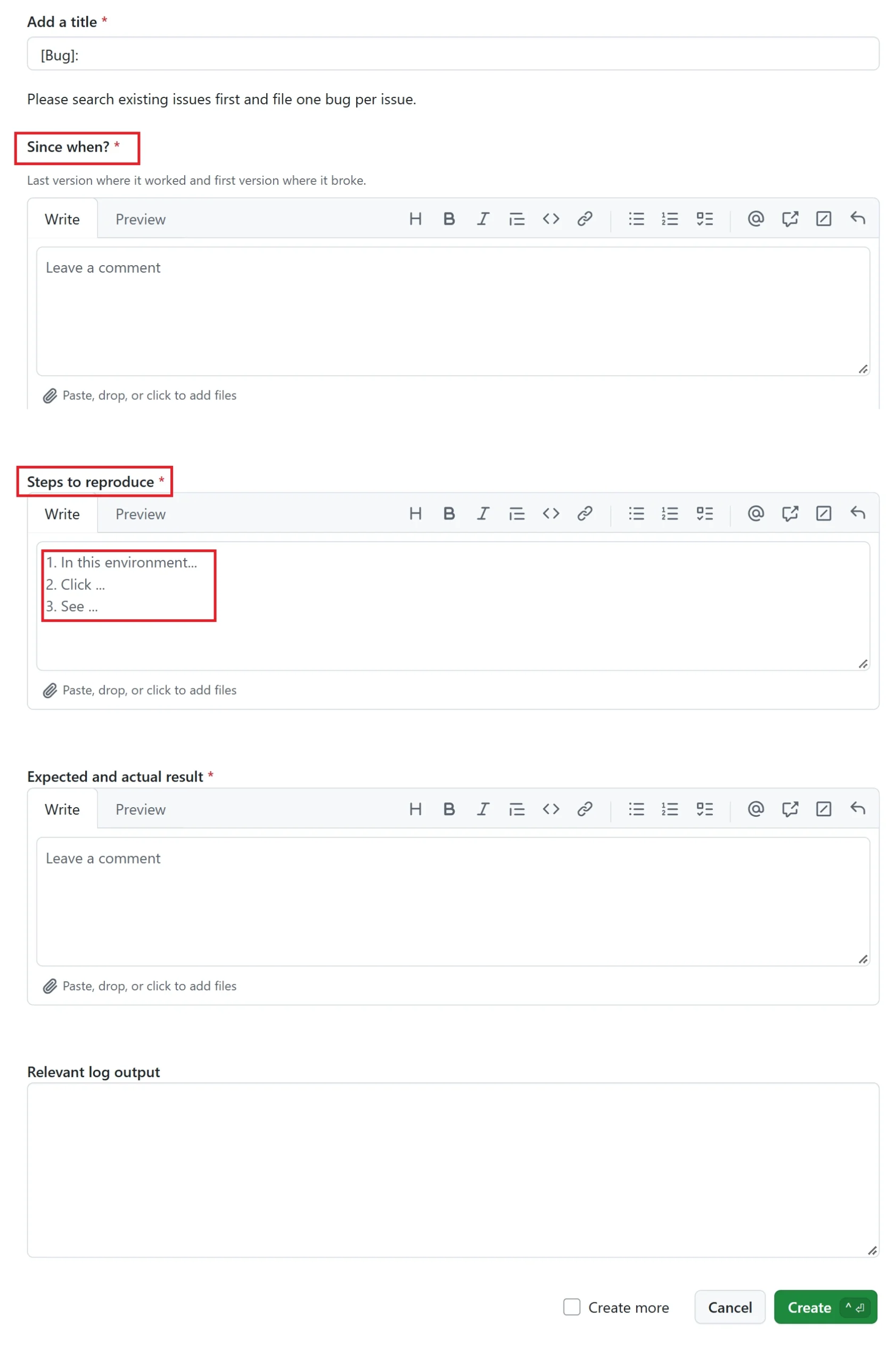
You can also use a YAML issue form, which renders real input fields. Save it in the same folder as bug-report.yml. According to GitHub’s issue forms syntax documentation, the required setting works only in public repositories, so in private and internal repos every field stays optional.
name: Bug report
description: Report a reproducible problem
title: "[Bug]: "
labels: ["bug", "triage"]
body:
  - type: markdown
    attributes:
      value: |
        Please search existing issues first and file one bug per issue.
  - type: textarea
    id: since-when
    attributes:
      label: Since when?
      description: Last version where it worked and first version where it broke.
    validations:
      required: true
  - type: textarea
    id: steps
    attributes:
      label: Steps to reproduce
      placeholder: |
        1. In this environment...
        2. Click ...
        3. See ...
    validations:
      required: true
  - type: textarea
    id: expected-actual
    attributes:
      label: Expected and actual result
    validations:
      required: true
  - type: textarea
    id: logs
    attributes:
      label: Relevant log output
      render: shell
Markdown templates and YAML forms can live in the same repository, so you can switch over gradually.
Template 3: quick three-question Slack or support template
Executives and customers abandon long forms. Three questions are enough, and you or your tooling can add the build and role afterward.
1. What were you trying to do?
2. What did you expect to happen?
3. What happened instead? (Paste any error text, and add a screenshot if you can.)
What to check before and after you hit Create
Before you submit: three checks that decide if the ticket gets fixed
Ask whether a stranger could run your steps without you. If not, the ticket isn’t ready. Check that your since-when line names a real build, because a guess sends developers to the wrong diff. And check that the report holds one bug, so assignment and retesting stay clean.
The full template fits a team with a tracker and a triage routine. For a customer who will abandon a long form, use the three-question version and fill the technical fields yourself from logs. Whichever tool found the bug, whether Playwright, Selenium, Appium or JMeter, attach its own report instead of retyping what it already recorded.
After you submit: triage, follow-up and retest
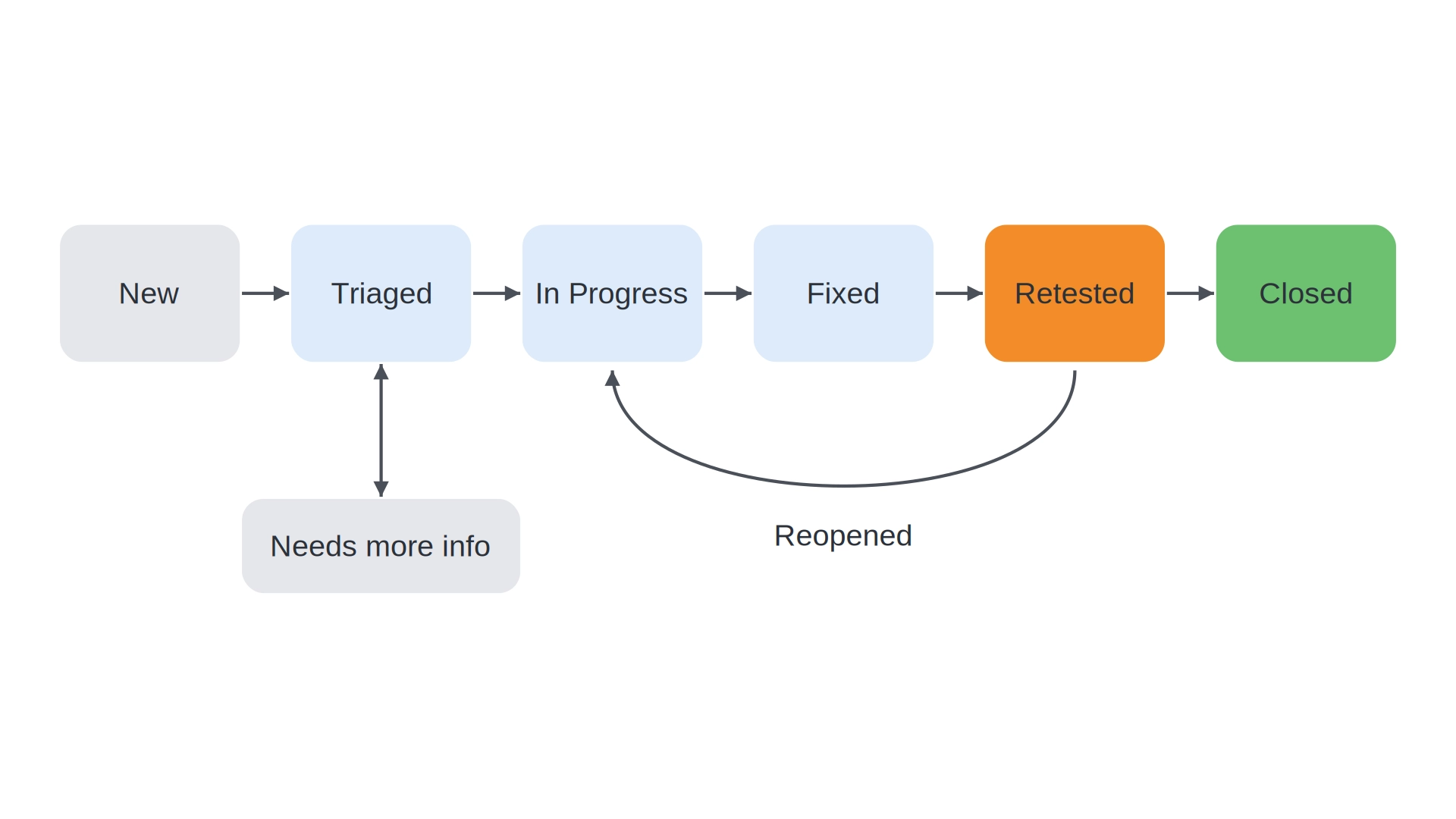
Most trackers move a bug through states like New, Triaged, In Progress, Fixed and Closed, though the names differ by team. Your job doesn’t stop at Create.
Answer developer questions on the ticket, not in a private chat, so the answer stays with the bug. When the status flips to Fixed, retest in the same environment, on the same build, with the same user role and test data. Then close it or reopen it with what you saw.
When a full report is the wrong tool
A production outage needs a call to the on-call channel first and a ticket afterward. A one-word typo needs a one-line ticket. A security flaw shouldn’t go into a public issue with exploit details, so follow the project’s security policy instead.
And if you saw a bug once and can’t repeat it, say exactly that. Add the timestamp and mark it “seen once.” Don’t invent steps to make the ticket look complete.
Bottom line: write for the stranger, then test your own ticket
The fastest way to learn how to write a bug report is to read your last one as a developer who has never seen the feature. Where would you stall? Probably at the starting state, the user role or the word “failed.” Fix those three and the ticket carries itself.
Treat each report as a small contract: you supply a reproducible fact, they supply a fix. Today, open the last ticket that came back with a question, rewrite it with the Jira template above, and add a since-when line.
Bug report questions testers ask most
What are the 3 most important elements of a bug report?
Steps to reproduce, the expected result and the actual result. Without those three, a developer can’t confirm the bug at all. Environment, a since-when line and evidence make the fix faster, but if you only have time for three, those are the three.
What is the difference between bug severity and bug priority?
Severity measures technical and user impact, from Critical to Low. Priority measures how soon the business wants the fix, from P1 to P4. A crash in a rarely used export can be high severity and low priority, while a typo in the logo on launch day is the reverse.
What should I do if a developer marks my bug as “Cannot Reproduce”?
Ask which build, environment and user role they tested, then rerun your steps exactly as written. Most mismatches come from role, data or build differences. Add what you find to the ticket, offer a short screen share, and fix your steps if they were incomplete.
How many times should I reproduce a bug before reporting it?
Two or three times is a good rule of thumb, recorded as “reproduced 3 of 3.” Reset to the same starting state before each attempt, since a leftover cart or session can make attempts differ. If it only fails sometimes, still report it, with the rate and a UTC timestamp for each failure.
Which template should I learn first: Jira, GitHub or Slack?
Learn the full Jira-style template first, because the GitHub and Slack versions are trimmed forms of it. Then use whichever one matches where the ticket will live: Jira or Linear for product teams, GitHub for repositories, and the three-question version for non-technical reporters.
