What to Automate First in Regression Testing: 4 Best Waves
It’s the evening before a release, the regression run is two hours in, and someone asks which of your 600 automated checks actually protect the business.
If you’re still working out what to automate first in regression testing, that question probably stings, because most suites grow by accident, one test at a time, until nobody can say why half of them exist.
That gap between having lots of tests and trusting them is where most teams get stuck.
This guide gives you an order. Four waves, a scoring matrix you can fill in during a 30 minute meeting, and the CI tiers that keep the result fast. Take what fits your project and skip the rest.
Table of Contents
Quick answer: automate in four waves
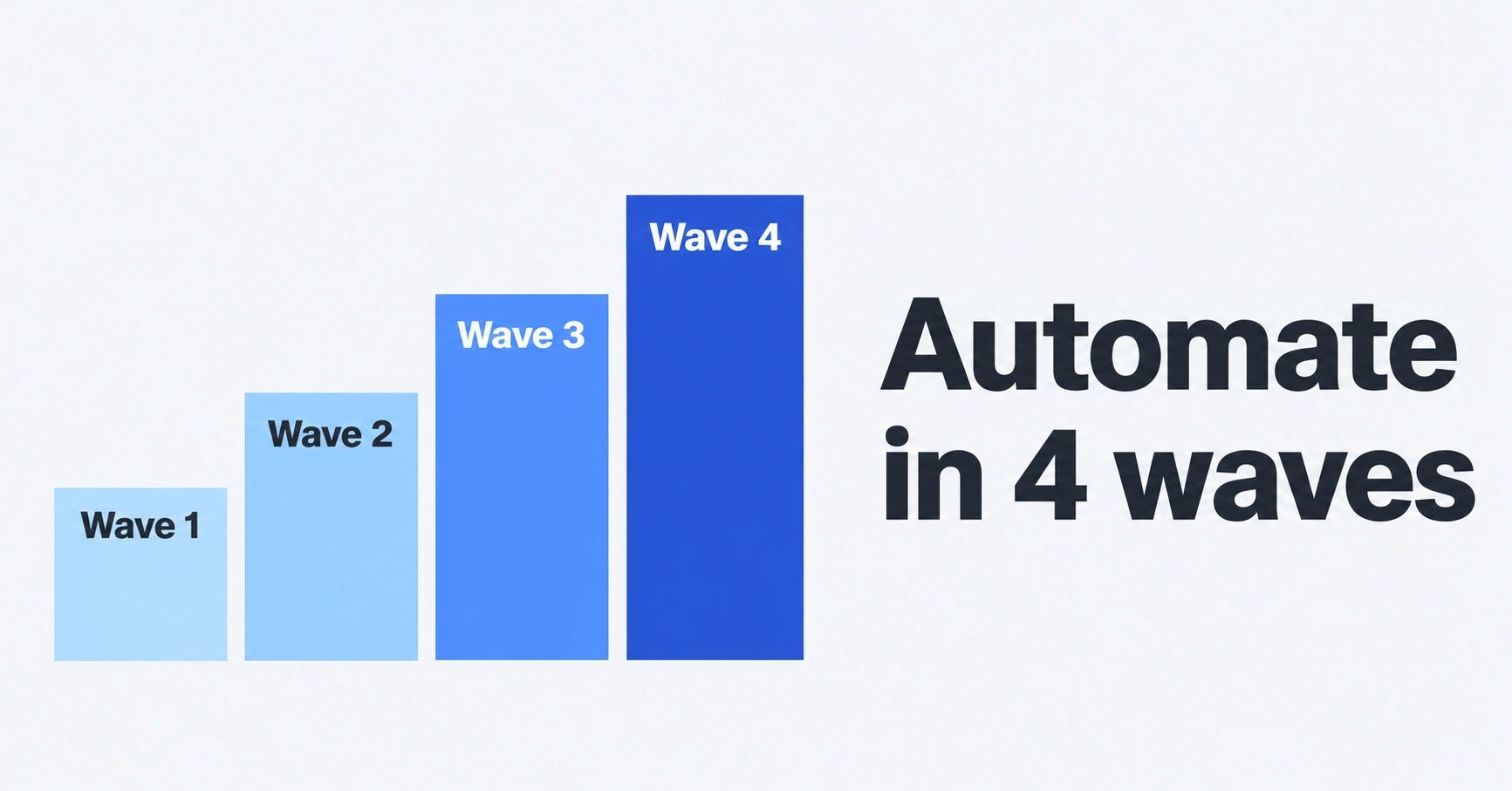
Automate in four waves. Start with a small smoke set around login and payments, then add one test for every bug that escaped to production, then cover stable high-traffic modules and integrations. Keep screens that are still changing this sprint on a hold list until they settle.
- Wave 1: smoke tests and revenue-critical flows (sign-in, checkout, billing).
- Wave 2: one test for every bug that reached production.
- Wave 3: stable, high-traffic modules and integrations.
- Wave 4: the hold list, which you deliberately do not automate yet.
Why a wrong automation order keeps costing you for months
Most teams ask how many tests they should automate. A better question, and the real heart of what to automate first in regression testing, is how many they can still afford to maintain six months from now.
QA Wolf, a company that builds and maintains end-to-end suites for clients, published numbers from 3.5 million automated test runs across more than 350 suites. On average, 15% of test runs failed. Working out why took about 17 minutes per failure, and repairing a broken test took another 45.
The split matters more than the minutes. Of those failures, 45% were flaky tests, 50% were broken tests, and only 5% were real product bugs. So roughly one red test in twenty told anyone something true about the product.
Keep in mind this is a vendor’s data from its own service, so read it as a direction, not a law.
In a separate QA Wolf experiment, 50 end-to-end tests from 20 clients were left unmaintained while those products kept shipping. Half of the starting coverage was gone by week six. It’s a small sample, but it matches what most of us have watched happen to a neglected suite.
Here’s the mistake I’d call out directly. Most teams turn their manual test cases into UI scripts in the order they appear in the spreadsheet. That’s the wrong fix. Spreadsheet order tells you when someone wrote the case, not how much it matters or how long that screen will stay the same.
On ecommerce and booking sites, I’d start with sign-in, search and checkout before anything else, because those are the flows where a failure costs real money.
How to prioritize test cases for automation without arguing for hours
Every flow in your app has a chance of breaking and a cost if it does. Multiply the two and you have a score. That’s the whole idea behind a risk-based approach, and it works because it makes the room rank things instead of defending favorites.
Likelihood comes from how often the code changes, how complex it is, and how many defects it has had before. Impact comes from lost revenue, legal or privacy exposure (GDPR and UK GDPR if you handle personal data), reputation, and how loudly support will hear about it.
A risk-based regression testing matrix you can fill in during one meeting
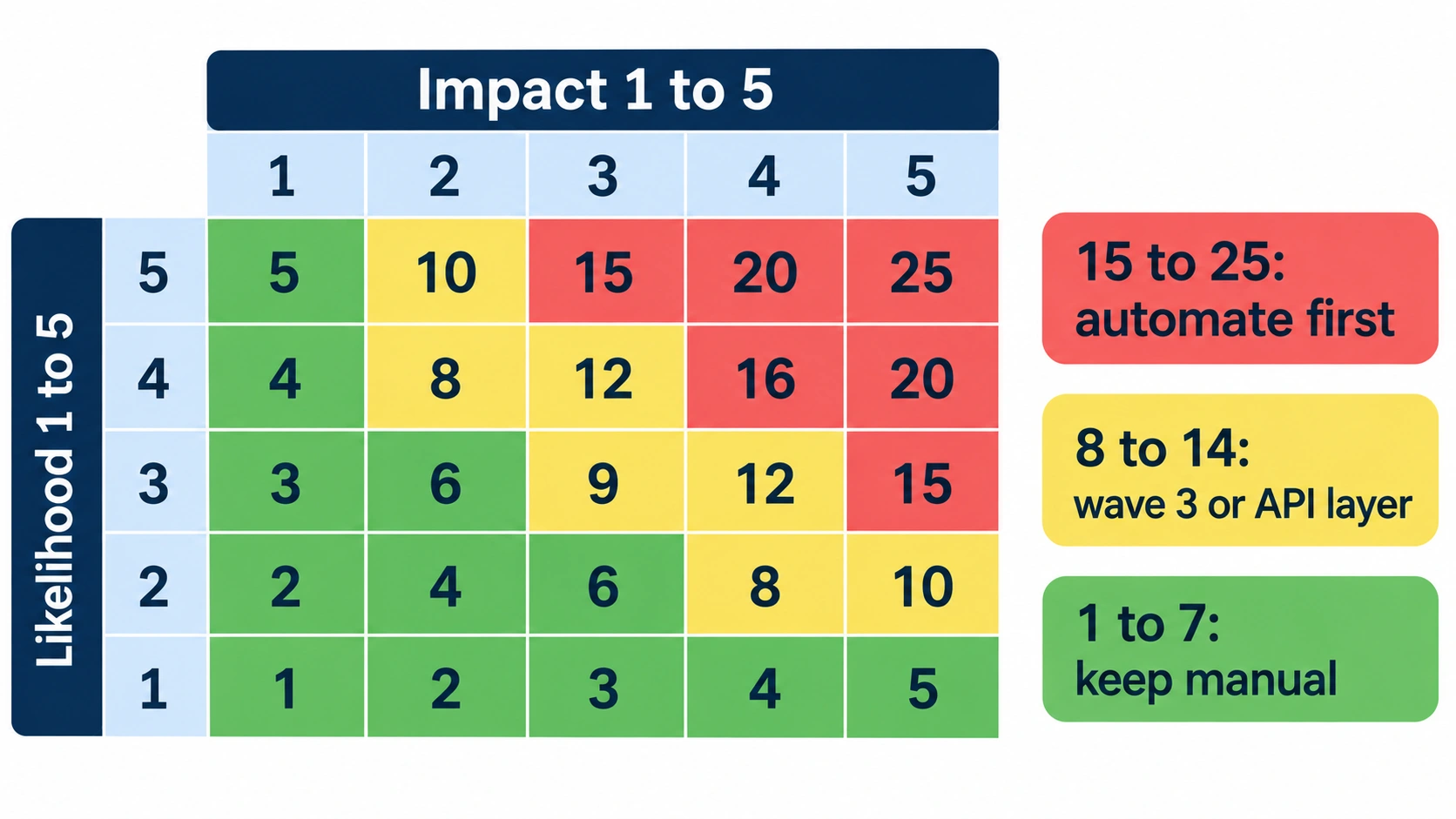
Put one developer, one support person and one tester in a room for 30 minutes. The developer knows what changes constantly, support knows what customers complain about, and the tester knows what breaks. List 20 to 30 flows and give each a likelihood and an impact from 1 to 5.
| Likelihood \ Impact | 1 | 2 | 3 | 4 | 5 |
|---|---|---|---|---|---|
| 5 (changes weekly, past defects) | 5 | 10 | 15 | 20 | 25 |
| 4 | 4 | 8 | 12 | 16 | 20 |
| 3 | 3 | 6 | 9 | 12 | 15 |
| 2 | 2 | 4 | 6 | 8 | 10 |
| 1 (rarely touched) | 1 | 2 | 3 | 4 | 5 |
I’d automate anything that scores 15 or higher first, send the 8 to 14 range to wave 3 (often at the API layer), and leave anything under 8 manual until it earns a place. Those cutoffs are my starting point, not a standard, so move them to fit your team.
If you’ve met failure mode and effects analysis, this is its lightweight cousin. That method multiplies severity, occurrence and detection. The matrix above keeps two of the three, which is enough for a first pass.
RCRCRC: a sanity check for what the matrix missed
Karen Nicole Johnson’s RCRCRC heuristic asks six questions: what’s Recent, what’s Core, what’s Risky, what’s Configuration sensitive, what’s been Repaired, and what’s Chronic. Run through it after you score.
It catches the things people forget to score. Configuration-sensitive code, such as emails that depend on environment settings, is a good example, and Johnson notes that this kind of code is more vulnerable.
A payback check before you write the script
Before scripting a flow, compare two numbers over the same period: the manual effort the script removes, and the effort to write and maintain it. Divide the first by the second. Above 1, the script pays for itself. Below 1, leave it manual. It’s my rule of thumb, not a published model.
Maintenance is the number people forget. If a test breaks every other sprint and each repair takes the 45 minutes QA Wolf reports on average, the ratio drops fast.
On one ecommerce project, a manual pass over the main areas takes me about 5 to 6 days. That covers the front-end checkout flow, multiple currencies, delivery countries and zones, shipping rates, offers and different product types, plus back-end data validation and order processing.
I run that pass every release, so every hour a script gives back is saved again each time, and that repeat is what the payback side of the ratio counts.
What to automate first in regression testing: the four waves
The day ranges below assume a team of two or three testers who also do other work. They’re estimates, and yours will move.
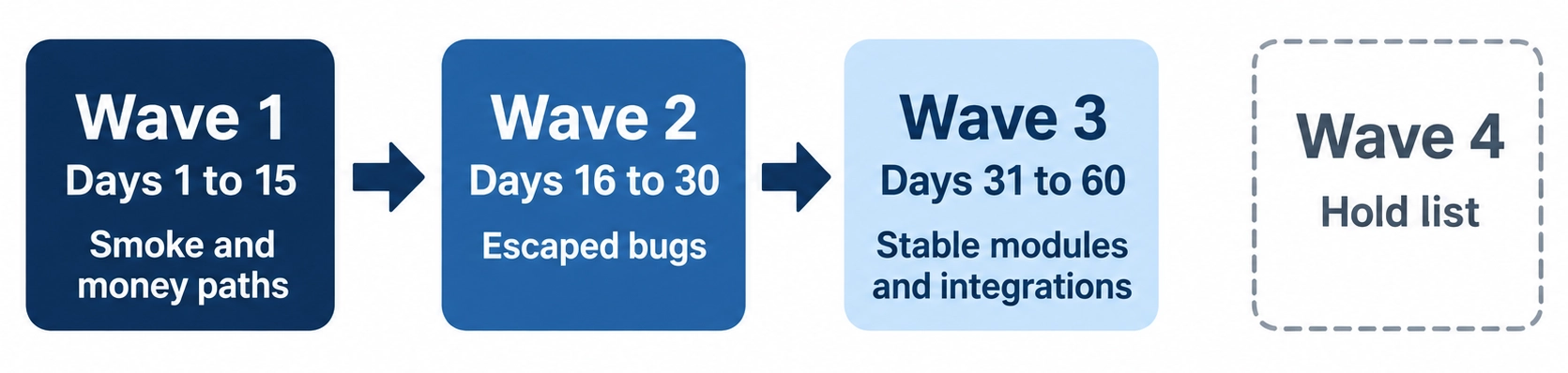
Wave 1, days 1 to 15: smoke tests and money paths
Pick 10 to 15 tests that would stop a release if they failed. Think sign-in (including single sign-on or multi-factor prompts if you have them), checkout and payment, billing and tax rules like VAT and proration, and the core order lifecycle from create to cancel.
If you sell in the EU or UK, your checkout probably includes a bank authentication step such as 3-D Secure. It’s a classic place for regressions to hide. Use your payment provider’s sandbox, never real cards.
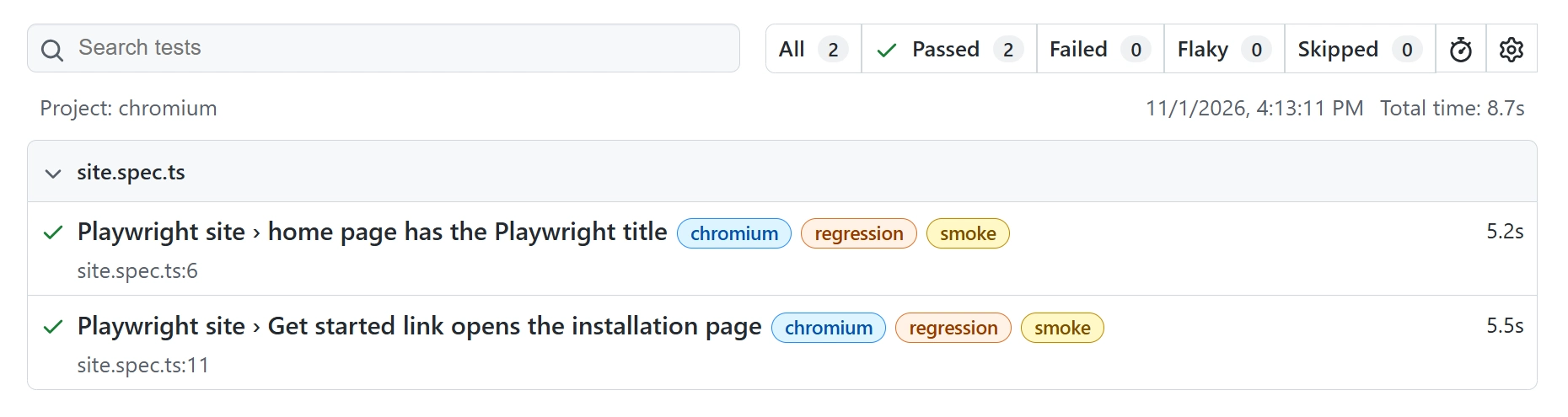
Tag every one of these @smoke from the first day, so they can run on every pull request.
Everyone says automate as much as you can. I’d rather ship 15 trusted tests in two weeks than 150 nobody trusts in two months.
Wave 2, days 16 to 30: every escaped bug becomes a test
Make one rule: no production bug closes without a regression test. A bug that already hurt a customer is proof the area is risky, which is exactly what the likelihood score tries to estimate.
Look at your defect tracker too. In many products a small share of modules produces most of the defects, the familiar 80/20 pattern, so put most of your effort there. Check it against your own data before you trust it.
Here’s one from our own project. The app offers social login buttons next to regular email login, and that feature had worked since the day it was introduced. Nobody touched it, but in one release the button was accidentally removed and the build shipped to production.
We added a check for it to the regression suite, confirming the social login button is present on the login page.
That’s the point of this wave. A feature nobody touches still needs a test, because the release that breaks it won’t announce itself. A payment timeout that triggers a retry and charges the customer twice is another bug that deserves a permanent test.
Wave 3, days 31 to 60: stable, high-traffic features and integrations
Now you can cover the features that rarely change but get used constantly: search, sorting, pagination, CSV import and export, webhooks, and syncs with systems like an ERP or CRM. Add role-based access checks, especially in multi-tenant products where one customer must never see another’s data.
If you serve EU customers, accessibility checks belong here too.
Many of these are better as API tests than browser tests. The next section explains why.
Wave 4: the hold list
When you’re deciding what to automate first in regression testing, the hold list matters as much as the first wave.
Some things should not be automated first. Screens still changing this sprint, A/B test variants, seasonal promotions that vanish in weeks, screens almost nobody visits (I’d say under half a percent of sessions), and exploratory checks that need human judgment about how something feels.
“Hold” doesn’t mean never. Revisit an item after it survives two releases without changing. Tests on moving targets are what produce the decay curve you saw earlier.
Test at the right layer, then run it in the right tier
Move checks down the stack before you write UI tests
Business rules like VAT, proration or discount math belong in unit or API tests. They run in milliseconds and don’t break when someone renames a button. Browser tests are for flows that cross screens, and full end-to-end coverage, in my view, should be reserved for money paths.
That doesn’t mean every money-path combination becomes a browser test. Keep one main checkout flow as the end-to-end test, push the many combinations, such as currencies, shipping rates and offers, down to API or unit tests, and leave the rarest ones manual. The browser only needs to prove the pieces connect.
Playwright makes the middle ground easy. With network interception, you can test how the UI behaves when a service fails, without needing the real service to fail. The example below tags tests and simulates a payment API error.
Tested with Playwright 1.64.1 and Node.js 24 on November 1, 2026.
// tests/checkout.spec.ts
import { test, expect } from '@playwright/test';

test.describe('Checkout', { tag: '@regression' }, () => {
  test('card payment succeeds', { tag: '@smoke' }, async ({ page }) => {
    await page.goto('/checkout');
    await page.getByRole('button', { name: 'Pay now' }).click();
    await expect(page.getByRole('heading', { name: 'Order confirmed' })).toBeVisible();
  });

  test('shows a retry message when the payment API returns 500', async ({ page }) => {
    await page.route('**/api/payments', (route) =>
      route.fulfill({
        status: 500,
        contentType: 'application/json',
        body: JSON.stringify({ error: 'Payment service unavailable' }),
      })
    );
    await page.goto('/checkout');
    await page.getByRole('button', { name: 'Pay now' }).click();
    await expect(page.getByRole('alert')).toContainText('try again');
  });
});
This is a pattern to adapt. It assumes baseURL is set in playwright.config.ts, and that your app has a /checkout page, a “Pay now” button and a /api/payments endpoint. Swap in your own. A fully runnable version, with a small stand-in checkout page, is in the demo repo as tests/checkout.spec.ts.
The describe block tags everything inside it @regression, and the first test carries @smoke on top.
Every tag must start with an @ symbol, as described in Playwright’s test API documentation, so a tag without it won’t filter the way you expect.
Run npx playwright test --grep @smoke and only the first test runs, so you’ll see one test pass. Run --grep @regression and both run.
I prefer role-based locators like getByRole here because they survive class-name refactors. That’s the difference between a green suite and one that turns red after a harmless front-end cleanup.
If your existing scripts still use XPath or CSS selectors, the XPath to Playwright locator converter turns them into Playwright locators ranked by accessibility best practices, in bulk if you need it. Selectors with conditions like not() fall back to the original, so review the output.
Handle dynamic data before it makes tests flaky
| Kind of data | Why it breaks tests | How to handle it |
|---|---|---|
| Order IDs and UUIDs | They change on every run | Assert on the format, or capture the value and reuse it |
| Timestamps | They depend on when the test runs | Control the clock, or assert inside a range |
| Generated emails and tokens | They must be unique per run | Create fresh test data per test and clean it up |
| Lists from unsorted queries | The database may return a different order | Sort explicitly, or assert on the set |
| Third-party content (ads, widgets) | It’s outside your control | Mock the call, or mask that region in screenshots |
Three CI tiers and the numbers I’d watch
| Tier | Trigger | What runs | Target time | Blocks merge? |
|---|---|---|---|---|
| 1. PR gate | Every pull request | @smoke plus tests for changed files | 5 to 15 minutes | Yes |
| 2. Nightly | Once a night | @regression, integration and API checks | 15 to 30 minutes | No, it opens a ticket |
| 3. Release candidate | Before shipping | Full suite, cross-browser and device matrix | 30 to 60 minutes | Yes, for the release |
Those times are targets I’d aim for, not measured results. For scale, a full manual pass on my ecommerce project takes me about 5 to 6 days, so even a 60 minute release candidate run would be a small fraction of that.
One CI detail bites people. Playwright’s --only-changed option, added in version 1.46, compares against a git ref, and CI checkouts are often shallow. Community write-ups report this error when the ref isn’t available: Error: Cannot detect changed files for --only-changed mode: git diff main --name-only. The fix people report in GitHub Actions is setting fetch-depth: 0 on the checkout step.
For the health of the suite itself, these are my rules of thumb, not an industry standard:
- Pass rate above 95%. Below 90% and people stop believing a red build.
- Flaky rate under 5%. Above 10% it’s noise, and real bugs hide in it.
- False positives under 2%. Each one teaches the team to ignore the next failure.
- Triage under 5 minutes per failure. QA Wolf’s average of 17 shows how far typical practice sits from that.
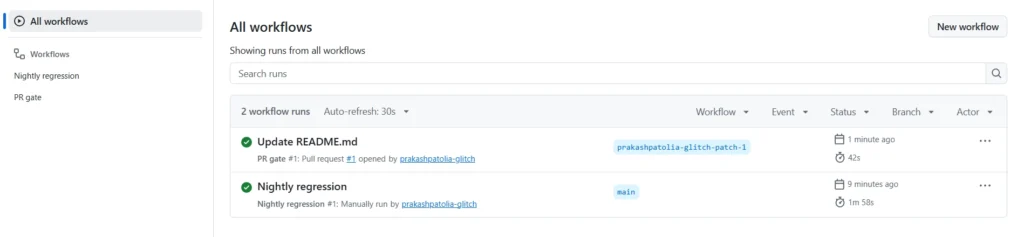
Past a few hundred tests: selective, prioritized and predictive test selection
A spreadsheet works for the first few hundred tests. After that, scoring by hand falls behind the code, and running everything on every commit gets slow. That’s the point where you need smarter selection.
Selective vs prioritized regression testing
These two get mixed up constantly. Selective regression testing chooses which tests run for a change. Prioritized regression testing decides the order they run in, so the riskiest ones fail first. You’d normally combine them: select what’s relevant, then run the highest-risk tests at the front.
Researchers score an ordering with a metric called APFD, the average percentage of faults detected. I wouldn’t bother measuring it until you have real failure history to measure against.
What predictive test selection is, and what the evidence says
Predictive test selection trains a model on historical test results to choose which tests to run for each change. The best public evidence comes from Meta. In their published research, the approach halved the infrastructure cost of testing code changes while still reporting over 95% of individual test failures and over 99.9% of faulty changes.
That’s Meta’s scale and Meta’s data, so don’t assume a small team gets the same result. The approach needs a long history of test outcomes and a way to deal with flaky results. I’m not quoting vendor claims for commercial tools because I couldn’t verify them.
The cheap first step is built into your runner. Playwright’s npx playwright test --only-changed=origin/main runs test files that changed against a ref. Community write-ups add that it also picks up test files importing changed files. Neither description mentions your application code, so don’t expect true impact analysis from it.
Jest has related options: npx jest --changedSince=main runs tests related to files changed since main, and npx jest --findRelatedTests src/cart/total.ts runs tests related to a named file.
If your product ships features built on language models, treat prompts and model versions as code that needs their own regression set. That deserves its own article.
What to check before you commit a test to the suite
These automated regression testing best practices come down to three questions. Would I stop a release if this failed? Has the feature stayed stable for two releases? Can I check the same thing below the UI?
Two yeses and a no means automate it. A shaky answer on stability means it goes on the hold list. The careless version of this decision is automating everything because the tool makes it easy, then paying for it in triage.
Whichever of Playwright, Selenium, Appium or JMeter you pick, the order holds, because it’s about risk and maintenance rather than the tool.
When this order will not fit
Regulated products, such as medical or banking software, may need low-traffic compliance checks in wave 1. If you have no CI yet, the tiers mean little, so start with a local smoke script.
A legacy app without stable APIs or test hooks pushes more work into the UI, and you should expect higher maintenance. And on a very small team, the day ranges will stretch.
Bottom line: start small and tie every test to a risk
The honest answer to what to automate first in regression testing is whatever hurts most when it breaks and changes least often. Everything else waits, and waiting is a legitimate choice.
Score your flows, build the smoke gate, and add one test per escaped bug. Then watch the numbers before you grow.
Here’s something to do today: list your 20 most important flows, score each one with the matrix, tag the top five @smoke, and run them in your pipeline this week.
Frequently asked questions about regression test automation
What is the difference between retesting and regression testing?
Retesting re-runs a specific test that failed, after a fix, to confirm that the fix worked. Regression testing runs a wider set of tests to check that the change didn’t break anything else. A retest is tied to one defect, while a regression suite protects the whole product.
Which should a beginner learn first, smoke tests or a full regression suite?
Start with smoke tests: 10 to 15 checks, quick to write, with value the team can see within days. They also teach tagging, CI and locator habits before you commit to a large suite. If you’re still choosing what to learn first, my software testing roadmap covers six stages from manual testing to AI.
What tests to automate first if I have hundreds of manual cases?
Score each case by likelihood times impact and automate the highest scores. Before scoring, merge duplicates. Hundreds of manual cases often include many that check the same behavior from slightly different angles, and automating all of them multiplies the maintenance cost.
How often should I update the risk matrix?
I’d review the top-scoring flows every release and re-score everything about once a quarter. Also re-score after any production incident, because it’s fresh evidence about likelihood that your team won’t have to guess at.
How do I automate regression testing from scratch?
Pick your wave 1 flows, write them with stable locators, tag them @smoke, and run them on every pull request. Then add a test for each production bug. Only after those two habits are working should you widen coverage to stable modules and integrations.

One Comment